Set Base Rotation and Base Offset in Meters
Set the base rotation and position of the connected headset, expressed in apparent meters.
Overview
The base offset is the translational difference between the current position of the headset and the actual position, which can be read by using Get Base Rotation and Base Offset in Meters.The axes of the vector are the same as for Unreal: X is forward, Y is right, Z is up.
Similarly, the base rotation offset is the rotational difference between the current rotation of the headset and the actual rotation,which can be read by using Get Base Rotation and Base Offset in Meters. It is expressed as an FRotator object with properties Pitch, Roll, and Yaw.
When you want to change the location of camera in the game space and not to change the actual position of the connected headset, you can change the base offset. Similarly, you can change the base rotation to change the camera rotation.
Blueprint
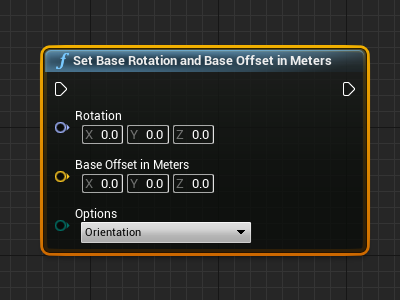
Arguments
- Rotation: The rotational difference between the current rotation of the headset and the actual rotation, that you wish to apply. It is expressed as an FRotator construct with the properties: Roll (X), Pitch (Y), Yaw (Z).
- Base Offset in Meters: The translational difference between the current position of the headset and the actual position, that you wish to apply. It is expressed as an FVector construct that translates the headset position into the (0,0,0) point, in meters.
- Options: Specifies what you wish to set: the orientation (rotation), the position (base offset), or both the orientation and the position.
Output
- No output.